
Pipedrive Review: What You Get in the 14-Day Trial (and After)
7.8/10 — Review score
Evidence confidence: medium
Tested Sep 20, 2026
ReviewMuzamal Ali · Updated · 3 min read
Testing evidence
- Tested by
- StackFairly founder
- Test period
- Sep 20, 2026
- Plan tested
- Premium (14-day trial — no permanent free plan exists)
- Region
- Pakistan-based account, US pricing referenced
- Pricing verified
- Sep 20, 2026
- Affiliate relationship
- Yes
Quick verdict
- Best for
Teams seriously evaluating a paid, pipeline-focused CRM — the trial gives full Premium access to test properly
- Not for
Anyone who wants a CRM to use free indefinitely — Pipedrive has no permanent free tier at all
- Cheapest paid step
Essential/Lite, roughly $12.50-14.90/user/month billed annually (verified Sep 20, 2026)
Before anything else, the most important fact about Pipedrive: it has no free-forever plan. HubSpot and Zoho both let you stay on a genuine $0 tier indefinitely; Pipedrive only offers a 14-day trial, and confirmed this directly in the account's own billing page ("14-day free trial," Premium tier, "$64 → $0/month" during the trial period only). If you're comparing free CRM options, that's the single fact that matters most before you invest setup time.
What the trial actually includes
To be fair to Pipedrive, the trial is genuinely generous — not a crippled preview. During testing we got full Premium-tier access: contacts, a 6-stage default sales pipeline (plus a second pre-built "Onboarding Pipeline"), deal tracking, activities, and — notably — up to 150 active automations with a real visual flow builder. No credit card was required to start.
| Plan | Price | Free option? | Automation |
|---|---|---|---|
| Trial | $0 for 14 days | Time-limited only | Full Premium access |
| Essential/Lite | ~$12.50-14.90/user/mo | No | Limited |
| Advanced | Mid-tier pricing | No | Expanded |
| Premium | ~$64/user/mo (what we tested) | No | Full — 150 active automations |
| Pricing verified Sep 20, 2026 | |||
Setup experience
Signup led straight into a structured setup wizard (Pipeline → Contacts → Activities), and — unlike both HubSpot and Zoho — the account started completely empty, no fake demo contacts pre-loaded. The default pipeline is labeled "tailored for your industry" with SaaS-style stage names (Qualified → Demo Scheduled → Demo Completed → Proposal Made → Negotiations → Contract Signed), and the account also included a second ready-made "Onboarding Pipeline" for post-sale stages.
Like Zoho, Pipedrive detected our location and set the deal currency to PKR and timezone to Asia/Karachi automatically — a third confirmation that locale-awareness varies noticeably between these tools (HubSpot defaulted to USD regardless of location in our testing).
Building the pipeline
Creating a deal only required linking a contact — no account/organization needed, closer to HubSpot's flexibility than Zoho's account-required flow. One quirk we hit: the deal title field auto-suggests the contact's name, and if you don't clear it first, your typed title gets prefixed with it rather than replaced — an easy first-time mistake.
The deal record itself is the richest of the three CRMs we've tested: a horizontal stage-progress bar at the top, a full activity tabset (Activity, Notes, Meeting scheduler, Call, WhatsApp, Email, Files, Documents, Invoice), and a genuinely satisfying "Won" celebration screen with close-time and activity stats when you close a deal.
Automation: the standout feature
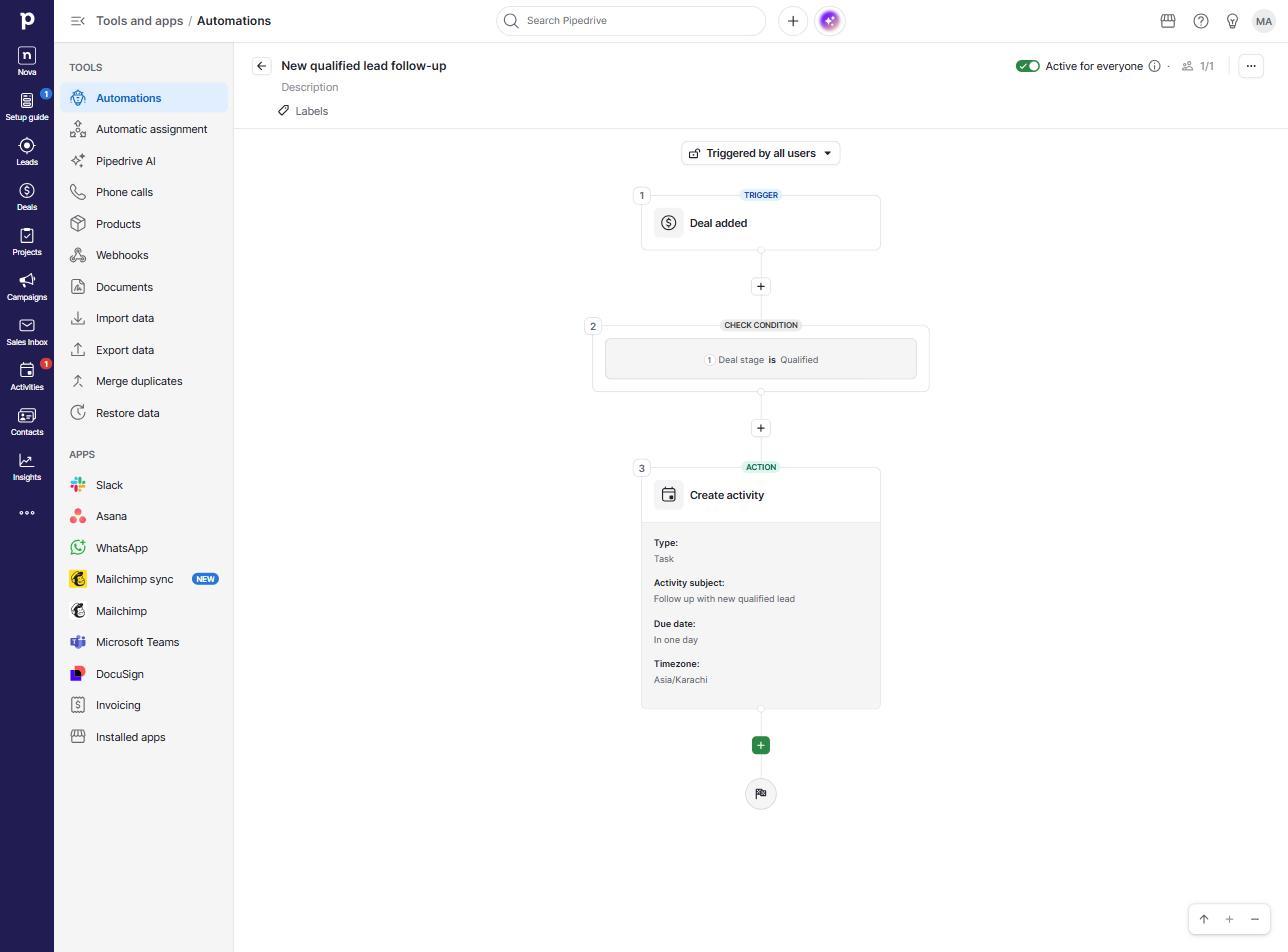
This is where Pipedrive pulled ahead of both competitors we've tested. Using the visual automation builder, we set a trigger (deal created in the Qualified stage), a condition check, and an action (auto-create a follow-up task) — and activated it without hitting any paywall or upgrade prompt. The trial account allowed up to 150 active automations, and the builder includes a "Wait" step for delayed actions, which Zoho locks behind its Standard tier.
Pros
- The most capable automation builder of the three CRMs tested — conditions, wait steps, and actions, no upgrade prompt hit during the trial
- Richest deal record: WhatsApp tab, meeting scheduler, and a proper post-sale onboarding pipeline included by default
- Locale-aware currency and timezone detection, like Zoho
- Account starts genuinely empty — no fake demo data padding your first impression
- No credit card required to start the trial
Cons
- No free-forever plan at all — this is the single biggest difference from HubSpot and Zoho
- Everything we tested reflects Premium-tier trial access, not what you'd get on the cheapest paid plan after the trial ends
- Deal title field can silently merge with the auto-suggested contact name if you don't clear it first
- At roughly $64/user/month, Premium is the most expensive tier we've priced across the three tools
Verdict: who should use it
Budget-conscious solo founder wanting a permanent free CRM: Skip this one — see our HubSpot Free CRM review or Zoho CRM Free Edition review instead.
Team seriously evaluating a paid, automation-heavy sales CRM: Use the 14 days deliberately — build a real pipeline, real automations, and test the actual workflow before the trial ends, since this is the fullest access you'll get before paying.
Anyone who wants automation without paying anything: Zoho's free plan includes 5 basic automation rules permanently; Pipedrive includes none once the trial ends unless you subscribe.
For the full cost picture across all three tools, see our realistic CRM budgeting guide.
Final verdict
7.8/10 · Evidence confidence: medium
Start Pipedrive's 14-day trial Affiliate linkFrequently asked questions
No. Unlike HubSpot and Zoho, Pipedrive has no permanent free tier. It offers a 14-day free trial with full Premium-level access and no credit card required, but once the trial ends you must subscribe to a paid plan to keep using the account.
The cheapest tier (Essential/Lite) starts around $12.50-14.90 per user per month billed annually. The Premium tier we tested during the trial lists at roughly $64/user/month at standard rates — always verify current pricing directly with Pipedrive before budgeting.
Yes — during our trial we built and activated a real automation (deal reaches a stage → auto-create a follow-up task) using a proper visual flow builder with conditions, wait steps, and actions. The trial account allowed up to 150 active automations, though this reflects Premium-tier trial access, not a permanent free allowance.
If budget is the priority and you want something to keep long-term for $0, HubSpot or Zoho's genuine free plans are the safer choice — see our comparisons. If you want to seriously evaluate a sales-focused, pipeline-first CRM before paying, Pipedrive's trial gives full access to test that fit, but budget for a subscription afterward.
Related articles
How Much Does a CRM Really Cost? A Realistic Breakdown
Free CRMs exist, but they have real limits. Here's what small businesses actually pay once they outgrow the free tier, with verified pricing from real vendors.
HubSpot vs Zoho CRM: Which Free Plan Is Actually Better?
We tested both free plans hands-on — contacts, pipelines, and automation. Here's exactly where each one wins, with no vague 'it depends' hand-waving.
Zoho CRM Free Edition Review: What You Actually Get (2026)
We tested Zoho's free CRM hands-on: contacts, a 7-stage pipeline, and working automation. Here's what's free, where it stops, and how it compares to HubSpot.

About Muzamal Ali
Founder, StackFairly
Muzamal Ali runs StackFairly, an independent software review site. Where an article says hands-on, the free plan was signed up for and used; research articles are labeled as research. Rankings are never influenced by affiliate payouts.