
Zoho CRM Free Edition Review: What You Actually Get (2026)
7.5/10 — Review score
Evidence confidence: medium
Tested Sep 16-17, 2026
ReviewMuzamal Ali · Updated · 3 min read
Testing evidence
- Tested by
- StackFairly founder
- Test period
- Sep 16-17, 2026
- Plan tested
- Free Edition
- Region
- Pakistan-based account, US pricing referenced
- Pricing verified
- Sep 17, 2026
- Affiliate relationship
- Yes
Quick verdict
- Best for
Anyone who wants working automation on a free CRM — Zoho gives you real instant-action rules where HubSpot gives you none
- Not for
Anyone who wants the simplest possible signup — the default flow pushes you into an Enterprise trial, not the free plan
- Cheapest paid step
Standard, $14/user/month billed annually (~$20/month billed monthly), verified Sep 17, 2026
What's actually free
Zoho's free tier is more capable than it first appears, but getting to it takes an extra step. The default signup enrolls you in a 15-day Enterprise trial, not the Free Edition — we had to go into account settings, click "Try Other Editions," and explicitly "Switch to Free edition" to test the plan most people actually want.
Once on the real Free Edition, the core CRM holds up well: contacts, accounts, deals, a 7-stage default sales pipeline, tasks, calls, meetings, and notes all worked without hitting a paywall. Contact imports are capped at 1,000 records per import, confirmed directly in the import wizard.
| Plan | Price (annual) | Users | Automation | Key unlock |
|---|---|---|---|---|
| Free | $0/mo | Up to 3 | 5 instant-action rules | Core CRM |
| Standard | $14/user/mo | Unlimited (paid) | More rules + scheduled actions | Multiple pipelines, forecasting |
| Professional | $23/user/mo | Unlimited (paid) | Blueprints | Inventory, validation rules |
| Enterprise | $40/user/mo | Unlimited (paid) | Zia AI | Custom modules, sandboxes |
| Pricing verified Sep 17, 2026 | ||||
Setup experience
Signup asks for name, email, a password, and a phone number — more friction than HubSpot's near-instant flow. It also detected our location and displayed "It looks like you're in PAKISTAN based on your IP," then defaulted sample deal data to PKR currency automatically. HubSpot, tested from the same location, defaulted everything to USD regardless. That's a genuine, useful difference: Zoho adapts to your locale out of the box.
Building the pipeline
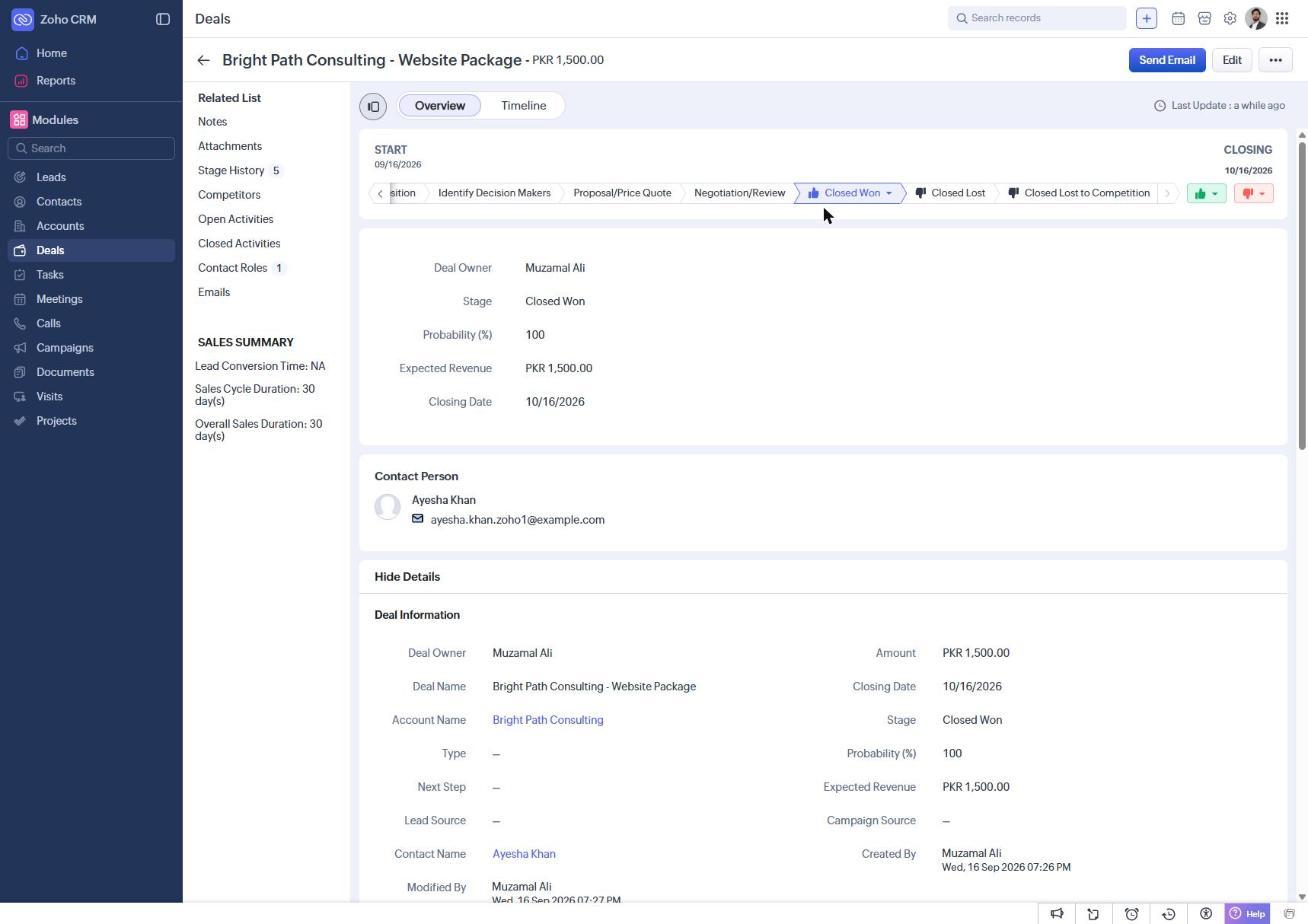
Zoho's default Sales Pipeline ships with 7 stages — two more than HubSpot's 5: Qualification → Needs Analysis → Value Proposition → Identify Decision Makers → Proposal/Price Quote → Negotiation/Review → Closed Won. One notable difference: creating a deal requires linking an Account, not just a contact — HubSpot lets you skip this. We moved a test deal through every stage via the horizontal stage tracker (a single click per stage, not drag-and-drop) and closed it won.
The Stage History log that Zoho keeps is genuinely more detailed than HubSpot's: every stage change records the amount, probability, expected revenue, closing date, and stage duration in a running table — a useful audit trail with no extra setup.
Where free ends — and where it doesn't
This is where Zoho differs most from HubSpot, and it's worth being specific rather than just saying "automation is locked."
Pros
- Workflow Rules — real automation — work on the free plan: up to 5 active rules with instant actions (create a task, send an email)
- Detailed Stage History audit trail on every deal, richer than HubSpot's free-tier activity log
- Locale-aware by default (currency, timezone) rather than defaulting everything to USD
- Contact/data export is unrestricted on free — no lock-in
- 7-stage default pipeline gives more granularity out of the box than HubSpot's 5
Cons
- Scheduled/time-delayed automation actions require upgrading to Standard — only instant actions are free
- Signup defaults to an Enterprise trial, not the Free Edition — easy to test the wrong plan by accident
- Deal creation requires an Account, adding a setup step HubSpot doesn't need
- We hit one real 40+ second stall reloading the app right after switching editions
Zoho vs HubSpot's free plan
The single biggest difference: HubSpot's automation is 100% locked on free — zero workflows of any kind. Zoho gives you 5 active instant-action rules for free, with only time-delayed/scheduled actions gated to a paid tier. If working automation is why you're comparing free CRMs, Zoho's free tier does more. See our full HubSpot vs Zoho comparison and our hands-on HubSpot Free CRM review for the other side of this.
Verdict: who should use it
Solo founder or freelancer who wants basic automation for $0: Strong fit — Zoho's free instant-action rules genuinely work, which HubSpot's free plan can't match.
Team of 3 or fewer, no urgent automation needs: Also solid — richer stage tracking and locale awareness are small but real conveniences.
Anyone who wants the absolute simplest signup: Budget a few extra minutes — you'll need to actively switch off the default Enterprise trial to reach the real free plan, and be prepared for one possible slow reload during that switch.
Final verdict
7.5/10 · Evidence confidence: medium
Try Zoho CRM Free Edition Affiliate linkFrequently asked questions
Both exist, and the signup flow defaults to the wrong one. Signing up through Zoho's main CRM signup page enrolls you in a 15-day Enterprise trial. The permanent Free Edition is a separate option you have to switch to manually (Settings menu → "Try Other Editions" → "Switch to Free edition"). If you just want the free tier, look for that link — don't let the trial run out and assume you've seen the free plan.
Yes — this is the biggest difference from HubSpot's free plan. Zoho's free tier includes up to 5 active Workflow Rules with instant actions (auto-create a task, send an email notification) triggered when a record is created or edited. Scheduled/time-delayed actions are locked to the Standard tier, but instant automation is real and we built and saved a working rule to confirm it.
Up to 1,000 records per import into the Contacts module, confirmed directly in the import wizard during testing. Zoho's own published free-tier documentation also cites a free-plan user cap of 3.
We hit one real hiccup: after switching from the Enterprise trial to the Free Edition, the app took over 40 seconds to reload and briefly showed a stalled loading screen, even though every network request succeeded. It resolved on its own. It's worth knowing this can happen, particularly right after an edition change.
Zoho, clearly. HubSpot's Workflows are 100% locked on its free plan with zero free tier. Zoho gives you 5 active instant-action rules for free. If automation is why you're evaluating a free CRM, Zoho's free tier is the more capable starting point. See our full comparison for the rest of the picture.
Related articles
Best CRM Software for Small Businesses (2026)
We tested HubSpot, Zoho, and Pipedrive hands-on — signups, pipelines, and automation. Here's which one actually fits your small team, and why.
HubSpot vs Zoho CRM: Which Free Plan Is Actually Better?
We tested both free plans hands-on — contacts, pipelines, and automation. Here's exactly where each one wins, with no vague 'it depends' hand-waving.
HubSpot Free CRM Review: What You Actually Get (2026)
We tested HubSpot's free CRM hands-on: contacts, a full pipeline, and logged activity. Here's what's really free, where the paywall hits, and who it suits.

About Muzamal Ali
Founder, StackFairly
Muzamal Ali runs StackFairly, an independent software review site. Where an article says hands-on, the free plan was signed up for and used; research articles are labeled as research. Rankings are never influenced by affiliate payouts.